Restoring an Old AMD Sempron 2500+ PC
Introduction
The other day I purchased an old computer. It reminded me of one I had in high school, so I thought I would document some of the things I plan to use it for. It booted and loaded Windows 2000. The owner mentioned only using it for a single task. Note that there is a very loud coil whine sound when switching on the power supply.
Hardware Specifications
- CPU: AMD Sempron 2500+
- Motherboard: WinFast 741M01C-GX-6L
- RAM: 512MB
- HDD: 120GB SSD (SATA to IDE adapter)
- Video: Integrated
- Sound: Sound Blaster Audigy 2 ZS (SB0350)
- Screen: Samsung Samtron 76e
- Keyboard: QWERTY
- Mouse: HP
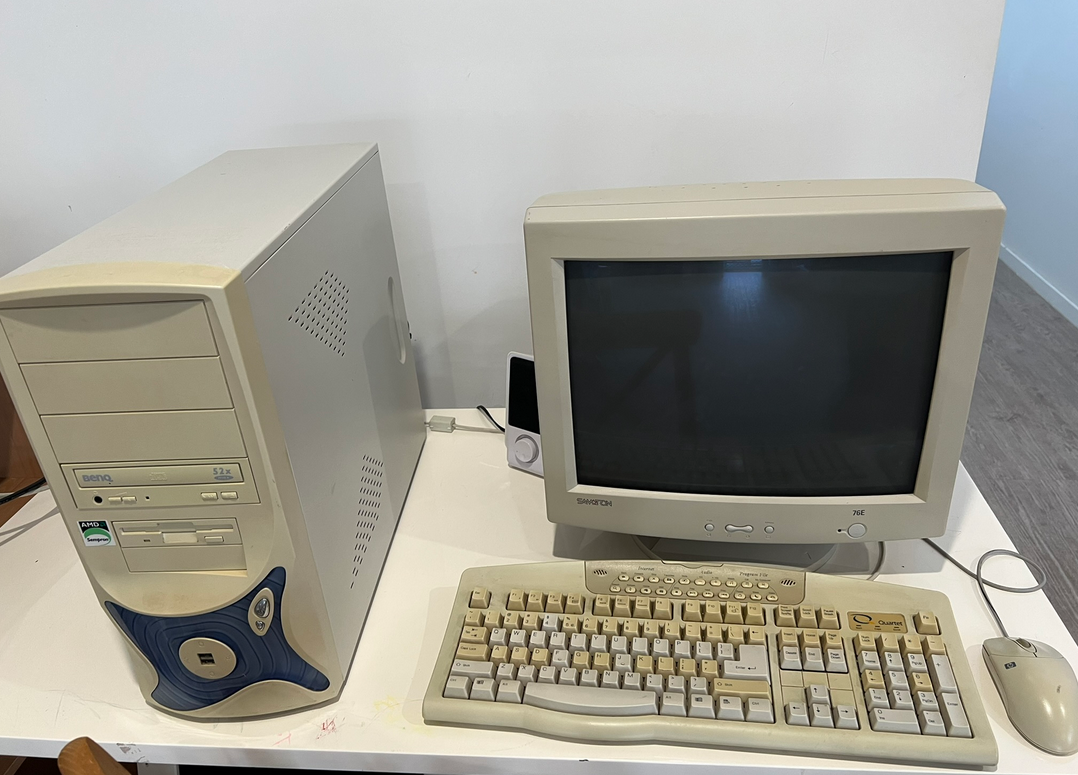
Software
The computer booted into Windows 2000. The CMOS battery had failed so there is an error on startup. I’ve used Drive Snapshot to take an image, and DriverBackup! (1.0.3) to take a copy of all drivers.
Motherboard Specifications
- Model: K7S741GXMG-6L (741M01C-GX-6L)
- Processor: Socket A for AMD Athlon™ XP / Sempron™ / Duron™ processors
- Chipset: SiS741GX + 963L
- Front Side Bus: 266/333 MHz
- Memory: DDR 266/333 x2
- VGA on Die: Integrated Ultra-AGP™II Graphics
- Expansion Slots: 1 AGP 8X (1.5v only), 3 PCI slots
- IDE: 2 UltraDMA 133 - supports up to 4 devices
- Audio: Realtek ALC655 5.1 channel (Drivers)
- LAN: Realtek RTL8201BL; 10/100 PHY
Back Panel I/O Ports
- 1 x PS/2 mouse
- 1 x PS/2 keyboard
- 1 x line-in / line-out / MIC ports
- 1 x parallel
- 1 x RJ45
- 1 x COM
- 4 x USB 2.0
- 1 x VGA port
Internal I/O Connectors
- 1 x USB 2.0 headers support 2 ports
- CD IN header
BIOS Features
- 2Mb flash ROM, PnP, DMI 2.0, WfM 2.0, SMBIOS 2.3, ACPI 1.0b
Standards/Manageability
- PCI 2.3, USB 2.0, WfM 2.0, DMI 2.0, WOL by PME, LPC 1.1 Interface, PC2001
Form Factor
- Micro ATX (9.4” x 8.4”)
Possible Drivers
- Chipset SiS 741GX: TheRetroWeb
-
Integrated Video SiS Real256E: Archive.org OEM Drivers
Objective
- Install Windows 98
If you want to run Windows 98 in emulation instead of on real hardware, see Various Methods for Running Windows 98. If the board needs repair work first (capacitors, batteries, soldering), see Learning to Solder.
Related guides
- Various Methods for Running Windows 98 — emulation and virtualization options instead of bare metal
- Learning to Solder — useful for repairing or recapping aging Socket A hardware
For alternative ways to run Windows 98 without bare metal, see Various Methods for Running Windows 98.
For alternatives to bare-metal installation, see Various Methods for Running Windows 98.
For alternatives to bare-metal installation, see Various Methods for Running Windows 98.
For alternatives to bare-metal installation, see Various Methods for Running Windows 98.
For a comparison of other ways to run Windows 98 on modern hardware or inside virtual machines, see Various Methods for Running Windows 98. If the hardware needs repair work before it will boot, the Learning to Solder guide covers the gear and skills needed for recapping and board-level fixes.
Configuration
Drive Preparation
- Connect the SSD drive to my main PC and use Rufus to image the drive with DOS.
- Copy the WIN98 setup files across.
- Connect the SSD to the old machine and run the WIN98 setup.
OS Preparation
- Install
nusb36e.exe/ 7-Zip. - Install IDE drivers.
- Install
uvga3_363a.zip(manually). - Install Sound Drivers (manually).
Drivers Status
- IDE: Pending
- AGP: This appears to fail
- VGA: This must be installed manually from
uvga3_363a.zip - USB 2.0: Pending
- AUDIO: Pending
- LAN: Pending